Guide · 9 min read
How to fill in an air waybill, box by box
An air waybill form has numbered boxes, and each one has a place in the FWB message too. This guide goes through the form in order, from the AWB number at the top to the signatures at the bottom, and names the FWB line that carries each box.
The form and the message
The air waybill follows a standard IATA layout with numbered boxes, the same for every airline. Its data also travels electronically in the FWB, the Cargo-IMP Air Waybill Data message. The box numbers below are the ones the FWB specification uses for each field, so you can match the paper form and the message.
In the tables, the FWB line column names the line of the message that carries the box. "(no tag)" is the AWB consignment details line straight after FWB/17, for example 020-12345675FRAJFK/T2K150.0: the AWB number, origin, destination, pieces and weight.
Not every box applies to every shipment. Leave a box empty when it does not apply; the boxes reserved for the carrier stay blank.
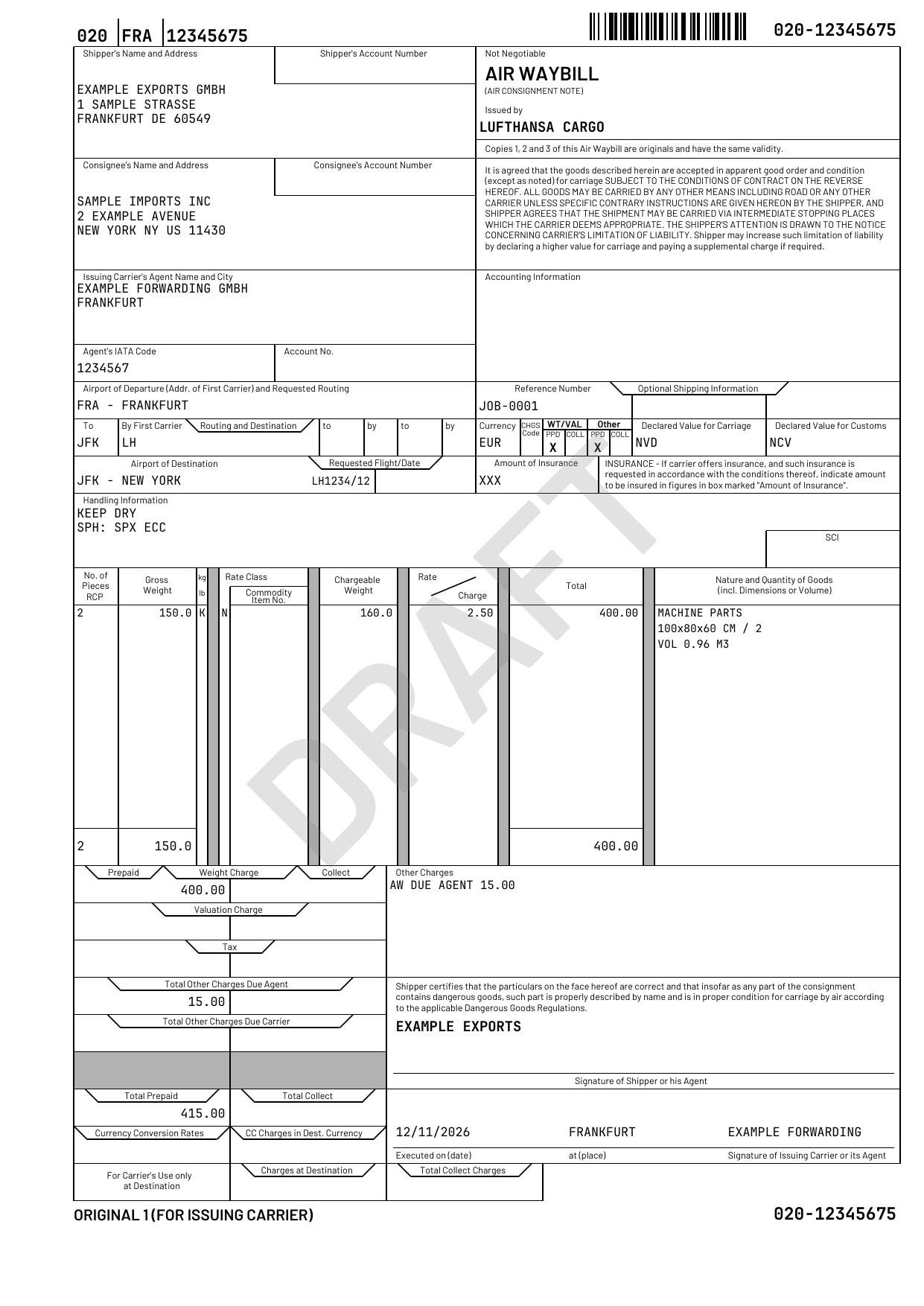
The AWB number and the issuing carrier
The AWB number is printed at the top left and repeated at the top right and the bottom right. It has 11 digits: the 3-digit airline prefix (box 1A) and an 8-digit serial whose last digit is the mod-7 check digit (box 1B), for example 020-12345675. The top-left number also shows the code of the airport of departure between the prefix and the serial.
| Box | What goes in it | FWB line |
|---|---|---|
| 1A | The airline prefix: the 3 digits that identify the airline whose number this is, such as 020 for Lufthansa Cargo | (no tag) |
| 1B | The serial: 8 digits, the last one the check digit | (no tag) |
| Issued by | The name of the issuing carrier. It has no box number and no FWB line: in the message, the prefix identifies the carrier | — |
Look up a prefix in the AWB airline prefix list and work out the check digit with the AWB check-digit calculator.
Shipper, consignee and agent (boxes 2 to 8)
| Box | What goes in it | FWB line |
|---|---|---|
| 2 | The shipper's name and address: name, street, place, state or province where used, country code, postcode and contact details | SHP |
| 3 | The shipper's account number with the carrier. In the FWB it is sent only by agreement with the carrier | SHP |
| 4 | The consignee's name and address, written the same way as the shipper's | CNE |
| 5 | The consignee's account number. In the FWB it is for the carrier's use at delivery | CNE |
| 6 | The issuing carrier's agent: name and city, usually the forwarder that issues the air waybill | AGT |
| 7 | The agent's IATA code: the 7-digit IATA cargo agent code, and the 4-digit CASS address where there is one | AGT |
| 8 | The agent's account number with the carrier, sent only by agreement with the carrier | AGT |
In the FWB, a name and a street take up to 35 characters each and a place up to 17, and the country is the ISO 2-letter code. Write every party in printable 7-bit ASCII; the slash (/) is reserved as the separator.
Routing and flights (boxes 9, 11, 18 and 19)
| Box | What goes in it | FWB line |
|---|---|---|
| 9 | The airport of departure, as the IATA 3-letter code, and the requested routing | (no tag) |
| 11A, 11B | To and by first carrier: the first transfer point or the destination, and the 2-character code of the carrier that flies that leg | RTG |
| 11C to 11F | The second and third to / by pairs, one for each onward leg | RTG |
| 18 | The airport of destination, as the IATA 3-letter code | (no tag) |
| 19A, 19B | The requested flights and dates: up to two booked flights | FLT |
The RTG line carries up to three airport and carrier pairs, one for each pair of routing boxes. The FLT line with booked flights is used only by agreement with the carrier. When a shipment has more than two flights, AWB Studio puts the details of the third and later flights in the handling information and the OSI line.
Accounting information and references (boxes 10 and 34)
| Box | What goes in it | FWB line |
|---|---|---|
| 10 | Accounting information for the carrier: up to six entries, each a 3-letter identifier and up to 34 characters of text | ACC |
| 34A | Reference number: your own reference for the shipment, such as a job or order number, up to 14 characters | SRI |
| 34B, 34C | Optional shipping information, up to 12 characters each | SRI |
Currency, charge codes and declared values (boxes 12 to 17 and 20)
| Box | What goes in it | FWB line |
|---|---|---|
| 12 | The currency of the charges, as the ISO 4217 code, for example EUR | CVD |
| 13 | The CHGS code: a 2-letter charges code. In the FWB it belongs in messages the carrier sends, so an agent leaves it empty | CVD |
| 14A, 14B | WT/VAL: whether the weight and valuation charges are prepaid (PPD) or collect (COLL) | CVD |
| 15A, 15B | Other: whether the other charges are prepaid or collect | CVD |
| 16 | The declared value for carriage, or NVD when no value is declared | CVD |
| 17 | The declared value for customs, or NCV when there is no customs value | CVD |
| 20 | The amount of insurance, or XXX when none is requested | CVD |
A declared value for carriage raises the carrier's limit of liability, and the carrier can ask for an extra charge for it. Insurance applies only when the carrier offers it.
Handling information (boxes 21 and 21A)
| Box | What goes in it | FWB line |
|---|---|---|
| 21 | What the carrier needs to know to handle the shipment: service requests, special handling codes, a party to notify, and customs and security details | SSR, SPH, NFY, OSI, OCI |
| 21A | SCI: the customs origin code, up to 2 characters | COR |
In the FWB, box 21 is split across several lines:
- SSR: special service requests in free text, up to three lines of 65 characters.
- SPH: special handling codes, up to nine, including the security status of the consignment (SPX, SCO, SHR or NSC) and the e-AWB code (ECC or ECP).
- NFY: an Also Notify party, such as a customs broker.
- OSI: other service information in free text.
- OCI: customs, security and regulatory control details, such as the screening details of an electronic consignment security declaration.
SSR, NFY, OSI and the customs origin code (COR) share one budget of 216 characters. Free text must not contain a slash (/).
The rate lines (box 22)
Box 22 is the rate description: one row for each rate line, then a totals row. In the FWB, each rate line is an RTD line.
| Box | What goes in it | FWB line |
|---|---|---|
| 22A | The number of pieces, or RCP for a rate combination point | RTD |
| 22B, 22C | The gross weight, with K for kilograms or L for pounds | RTD |
| 22D | The rate class: one letter, such as M (minimum charge), N (normal rate), Q (quantity rate) or C (specific commodity rate) | RTD |
| 22E | The commodity item number of a specific commodity rate, or the percentage of a class rate | RTD |
| 22F | The chargeable weight: the weight the charge is worked out on | RTD |
| 22G | The rate per kilogram or pound, or the charge itself for a minimum charge | RTD |
| 22H | The total charge of the rate line | RTD |
| 22I | The nature and quantity of the goods: a description with the dimensions or volume, and where used the HS code and country of origin | RTD |
| 22J, 22K | The total number of pieces and the total gross weight | (no tag) |
| 22L | The total of the rate line charges | PPD / COL |
The chargeable weight is normally the greater of the gross weight and the volume weight; the carrier's tariff sets the volume factor. In the FWB, the goods description takes up to 20 characters per line, and the dimensions or volume follow it, or NDA when no dimensions are available.
When the charges are as agreed with the carrier, AWB Studio can print AS AGREED in place of the rates, the totals and the charge summary. The chargeable weight is still printed.
Other charges and the charge summary (boxes 23 to 30)
| Box | What goes in it | FWB line |
|---|---|---|
| 23 | Other charges: for each, a 2-letter charge code, whether it is due to the agent (A) or the carrier (C), and the amount | OTH |
| 24A, 24B | The weight charge | PPD / COL |
| 25A, 25B | The valuation charge | PPD / COL |
| 26A, 26B | Tax | PPD / COL |
| 27A, 27B | The total of the other charges due to the agent | PPD / COL |
| 28A, 28B | The total of the other charges due to the carrier | PPD / COL |
| 30A, 30B | Total prepaid and total collect | PPD / COL |
Each charge box has a prepaid column (A) and a collect column (B), following the prepaid or collect choice of boxes 14 and 15. In the FWB, the prepaid summary is the PPD line and the collect summary the COL line; at least one of the two must be present. OTH lists each charge code and entitlement only once.
Shipper's certification and carrier's execution (boxes 31 and 32)
| Box | What goes in it | FWB line |
|---|---|---|
| 31 | The signature of the shipper or its agent, under the certification | CER |
| 32A | Executed on: the date the air waybill is issued | ISU |
| 32B | At: the place where it is issued | ISU |
| 32C | The signature of the issuing carrier or its agent | ISU |
By signing box 31, the shipper or its agent confirms that the details on the air waybill are correct, and that any dangerous goods in the consignment are correctly named and ready for air transport under the dangerous goods regulations.
In the FWB, CER carries the shipper's signature as up to 20 characters, and ISU the issue date, the place and the signature of the issuing carrier or its agent. In IATA's own example message, the agent's name is the signature in ISU. AWB Studio stamps the issue date once, when the air waybill is first issued, and keeps it on every reprint.
Boxes left blank
A few areas of the form are not filled in by the forwarder, and AWB Studio leaves them blank:
| Box | What goes in it | FWB line |
|---|---|---|
| 22Z | The service code: an optional one-letter code on a rate line, rarely used by forwarders | — |
| 29 | A shaded row of the charge summary, with nothing to fill in | — |
| 33A to 33D | For the carrier's use at destination: the currency conversion rate, the collect charges in the destination currency, the charges at destination and the total collect charges | CDC |
In the FWB, the CDC line for boxes 33A to 33D is used only at delivery time.
Check it, then hand it off
The free FWB validator opens at public launch. You will then be able to paste an FWB into it and see what its checks flag, with the line, the field and the fix. It will check the check digit, mandatory lines, party addresses, charges, and special-handling and security codes. Airlines can apply additional rules of their own. See what the validator will check. Until then, check the AWB number with the free AWB check-digit calculator, which works now.
AWB Studio does not transmit to airline systems. Copy or download the FWB and submit it through your airline's or handler's portal, your cargo community system or your messaging provider.
On a consolidation, the master air waybill covers the whole consignment and each shipper's goods get a house air waybill: see MAWB vs HAWB. To fill in the FWB itself, line by line, see how to create an air waybill, step by step.
Published 6 November 2026. AWB Studio is not affiliated with IATA.